Documentation
Everything OpenGSO does, and how.
From the first install to the weight of every check and the header on every response. If a question is not answered here, open an issue on GitHub.
Install
OpenGSO is free on npm and needs Node.js 22 or later on macOS, Linux or Windows.
npm install --save-dev opengsoThat is the whole toolkit plus the local dashboard. OpenGSO is five packages built from one codebase, so a project can install only the part it uses. Every one of them exposes the same opengso command, and a package asked for something it does not ship names the package that does.
| Package | Ships | Install it when |
|---|---|---|
opengso | everything, plus the local dashboard | you want the whole thing, or you want a UI |
opengso-cli | test, generate, prod test, prod data, settings | you want the whole toolchain, terminal only |
opengso-testing | test | you only want to score a site |
opengso-generate | generate | you only want the markdown twins and root files |
opengso-prod | the middleware, plus prod test and prod data | this is the one that runs on your server |
opengso-prod is the package that ends up in a production dependency, so it has zero dependencies. The library your server imports has no HTML parser and no AI provider code: it reads files that generate already wrote and does a map lookup per request. The build checks that on every release.
Quickstart
npx opengso                                  # the terminal app: where you stand, and what to do
npx opengso start                            # set the project up, then open the dashboard
npx opengso test https://your-site.com       # score it as it is today
npx opengso generate https://your-site.com   # write the twins and the three root files
# wire opengso-prod into your server (see Prod below)
npx opengso prod test https://your-site.com  # prove the deployment serves them correctly
npx opengso test https://your-site.com       # score it again
opengso on its own opens the home screen: your project, its last score, how many twins it has, and a menu of everything there is to do. Piped or run from a script it prints the help page instead, so nothing that shells out to it changes behaviour.
opengso start asks four questions the first time it runs in a directory: your site URL and web root, which AI agents get the markdown twin, blocking, and an optional API key. After that it goes straight to the dashboard. opengso settings asks the same questions in the terminal, with your current answers as the defaults, and prints what actually changed.
Nothing in the quickstart needs an API key. The structural test, generate's free tier and all of opengso-prod run without one.
Test a URL
opengso test scores a live URL from 0 to 100 and says exactly what failed. Give it the full address, scheme included. Anything your machine can reach works: production, a staging host, or http://localhost:3000.
opengso test https://your-site.com               # the checks, then an AI review of the markdown
opengso test https://your-site.com --structure   # the checks alone. Also --offline, -nq. No key, no cost
opengso test https://your-site.com --content     # the AI review alone
opengso test https://your-site.com -q            # the full run, with the review required
The structural pass is the score: 22 deterministic checks, no model involved, the same responses always producing the same number. The content review is a second, optional pass that reads every markdown document the site serves and grades it out of 100 on its own. It needs a key, refuses to run in CI, and prints as its own section. The two numbers are never blended.
Reading the report
Rows are grouped worst first: failed, partly there, suggestions, locked, passed, adopted, not applicable. Each row names the check, what it verifies and the specific reason it reached its verdict, with the header value or rule actually observed. A partial row shows a small meter and the split, 2 of 4. A suggestion is marked TIP rather than with a cross, because it is not a failure.
The Next.js demo in the repository, before anything had been generated for it:
OpenGSO test  http://localhost:3000/resume
Detected: Next.js

   65/100  ███████████████▋░░░░░░░░  4 of 6 scored checks passed, 2 failed, 1 n/a
    ideas  ██▒▒▒▒▒▒▒▒▒▒▒▒▒▒▒▒▒▒▒░░░  1 of 15 suggestions adopted, 12 waiting on B1


Failed (2)
----------
  FAIL A1 robots.txt exists and does not disallow known AI bots  -18 pts
      No robots.txt at http://localhost:3000/robots.txt (HTTP 404). AI crawlers
      get no explicit signal about what they may read.
      → Serve a robots.txt that allows the AI agents you want reading the site
        (+18). `opengso generate` writes one.
The report ends with Do this next: every scored fix ranked by the points it recovers, so the top line is always the most valuable edit you can make. The suggestions follow under their own heading, heaviest first. Every price the report prints is in score points, how far that one fix would move the headline, and not the check's weight.
Test the same URL again and the headline says what moved since the last run, such as +15 since 2h ago, with a sparkline of the runs before it. The history is kept in .opengso/history.json, newest 20 runs per URL, and is never served.
Options
| Option | What it does |
|---|---|
--prompt | Print a ready-to-paste fix prompt for a coding agent instead of the report. |
--copy | Put that fix prompt on the clipboard. With --prompt it prints and copies; alone it copies after the report. |
--only <ids> | Scope the prompt to some checks: --only A3 or --only B1,B7. An unknown id exits 2. |
--strict | Fail the build on a suggestion that fails too, not only on a scored check. |
--verbose, -v | Show why each passing check passed, not just the failures. |
--json | Machine-readable output. |
--out <file> | Write the output to a file instead of stdout. |
--provider <name> | Which AI provider runs the review. opengso help providers lists them. |
--model <name> | The model id, for the review only. |
--max-docs <n> | How many documents the review reads. Default 10. |
--project <dir> | The directory holding opengso.config.json. Default the current one. |
--timeout <secs> | Per-request timeout. Default 15. |
Exit codes
opengso test exits 1 only when a scored check fails, so it drops into CI without failing builds over conventions a site has not adopted. --strict widens that to any failing check, for a project that has adopted the markdown layer and wants CI to notice the day it stops being served. Exit 2 means the command line could not be run as written: an unknown option, a malformed value, no URL. The exit code always comes from the structural checks, so a model's opinion can never fail a build.
The fix prompt
Every test result can become one Markdown prompt to paste into Claude Code or any coding agent with access to the repository.
opengso test https://your-site.com --copy              # the report, then the prompt on your clipboard
opengso test https://your-site.com --prompt            # the prompt instead of the report
opengso test https://your-site.com --prompt --only A3  # one check
opengso test https://your-site.com --copy --only B1,B7 # a few
The prompt carries the score, the URL, the expected twin URL and the detected framework, then each failed check with the points it cost, what actually happened, what to change, and a "Done when" line naming the command that proves it fixed. Suggestions follow, each marked as outside the score, then the twelve checks waiting on B1. It links only to opengso-prod and OpenGSO's own documentation.
Framework detection covers Next.js, Nuxt, Astro, SvelteKit, Remix, Gatsby, Docusaurus, Hugo, Jekyll, WordPress, Vite and plain HTML, so the prompt tells the agent where the middleware actually goes. It matches only markers a framework emits itself, never a word in the page's text.
--copy uses the clipboard your system already has: pbcopy on macOS, PowerShell (then clip) on Windows and WSL, wl-copy, xclip or xsel on Linux. Over SSH with none of those, it asks the terminal to set its clipboard. When nothing works it says so, and --prompt --out fix-prompt.md saves the prompt to a file instead. A failed copy never changes the exit code.
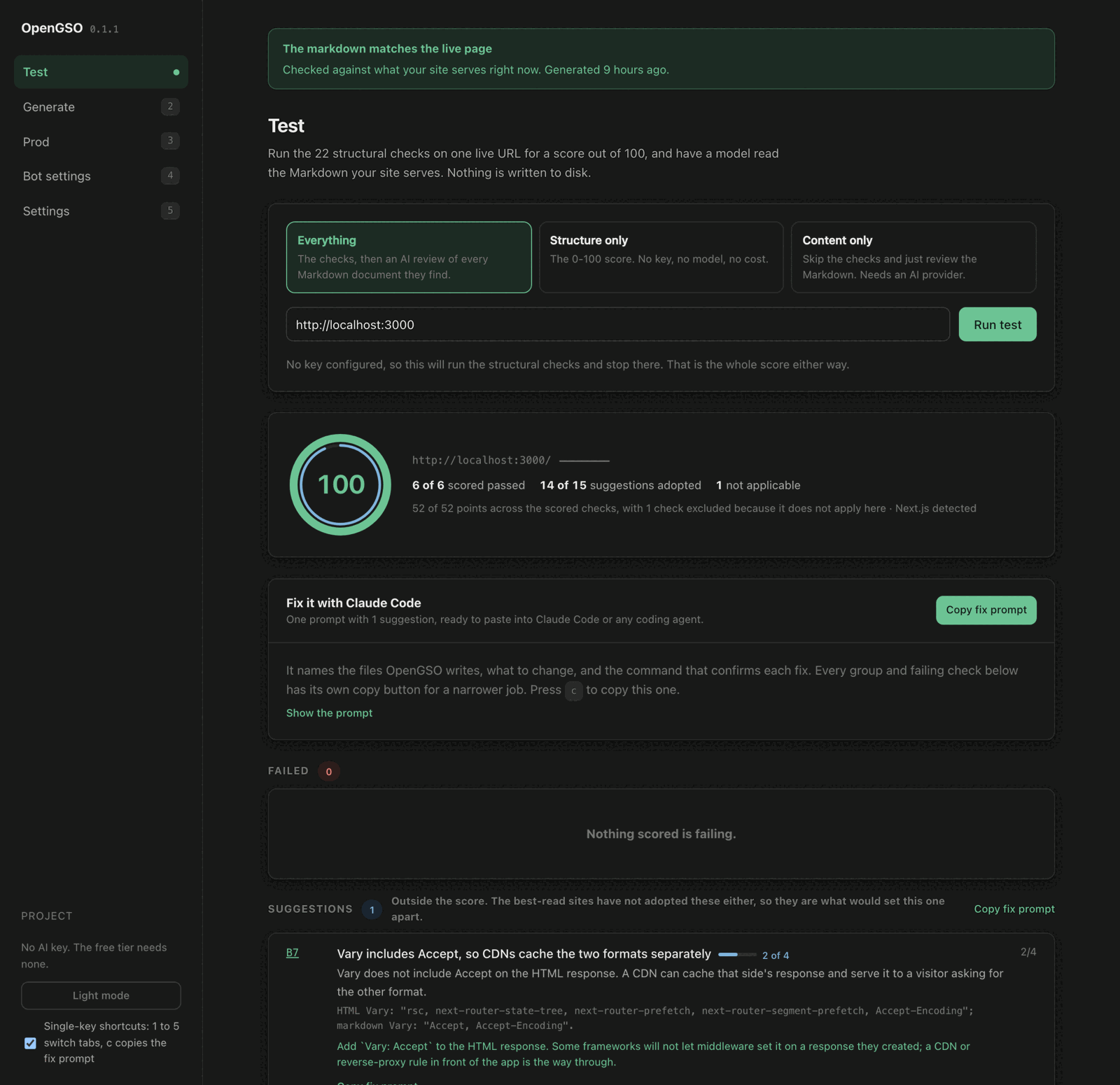
The same prompt is one keypress away elsewhere. The dashboard has a Fix it with Claude Code card, a copy button on every group and every failing check, and copies everything when you press c. The home screen offers c when a test finishes.
Anything the site sent, such as a header value or a JSON-LD field, is quoted as a single-line code span, fenced so it cannot close its own span, and cut at 400 characters. The prompt tells the agent that quoted text is evidence and never instructions, so a server cannot use its own responses to add steps to the prompt.
Generate
opengso generate crawls a site once and writes the files AI agents want: a clean markdown twin of every page, plus robots.txt, llms.txt and sitemap.xml.
npx opengso generate http://localhost:3000public/
md/
index.md served at /index.md
about.md served at /about.md
pricing.md served at /pricing.md
robots.txt
llms.txt
sitemap.xml
.opengso/
manifest.json bookkeeping, outside the web root, never servedThe crawl is a same-origin breadth-first search over real links from the URL you give it, up to crawl.maxDepth deep and crawl.maxPages requests. A page nothing links to goes under extraRoutes. Set publicOrigin to the deployed address and every absolute URL generate writes names it, rather than the dev server that was crawled.
Two tiers
- Free, the default. Algorithmic and deterministic, needs no key, and produces the markdown everything else is measured against.
- AI, with
--tier ai. Rewrites each page with your provider, then verifies the result: every number, date, price and percentage in the algorithmic extraction must survive with its sign and scale, and the model may not add one. If anything goes missing or appears, the AI output is discarded and the algorithmic version is written instead, with a warning naming the fact. The AI tier runs only on your machine and refuses to run in CI.
It never overwrites your files
A robots.txt, llms.txt or sitemap.xml without OpenGSO's generated-by marker is left exactly as it is, and OpenGSO's version is written beside it as robots.txt.opengso-proposed with a warning naming both paths. Twins follow the same rule: a file whose frontmatter does not say OpenGSO wrote it is left alone. --force is the only way past that. Set generated_by: manual in a twin's frontmatter to claim it as yours and have it served as is.
Frontmatter
---
title: "Pricing"
url: "https://example.com/pricing"
last_updated: "2026-10-20T09:12:44.102Z"
tokens: 412
source_hash: "0cdc3ec67ce75fa0"
generated_by: "opengso-free"
description: "Plans, prices and what each one includes."
---
The prod middleware strips the frontmatter before serving and moves the same facts into response headers. source_hash is taken over the extracted markdown, not the raw HTML, so it changes exactly when the page's content changes and not on every rebuild.
Options
| Option | What it does |
|---|---|
--tier <free|ai> | Free is algorithmic and needs no key; AI is bring-your-own-key and fidelity-checked. |
--origin <url> | Where the site is published. Every link in the twins, llms.txt and sitemap.xml names it. |
--check | For a folder of files: report the twins older than their page, exit 1 if any are, and write nothing. |
--single | Only the URL given, leaving every other page in the manifest alone. |
--max-pages <n> | Override crawl.maxPages. |
--depth <n> | Override crawl.maxDepth. |
--timeout <secs> | How long to wait for each page while crawling. Default 20. |
--force | Overwrite hand-written root files and twins. |
--skip-files | Twins only; leave robots.txt, llms.txt and sitemap.xml alone. |
--prune | Delete orphaned twins OpenGSO wrote for pages this run no longer found. Never deletes a file OpenGSO did not write. |
--json | Machine-readable output. |
Generate is a local, deliberate act, so it is a devDependency and never runs in production or on a schedule. A twin is a cache, and check B14 in opengso test is the safety net that says when it has gone stale.
Static sites
A site that is a folder of HTML files needs no server and no crawl. Point generate at the folder and it writes each twin beside its page, under the name a static host serves at the page's URL plus .md.
npx opengso generate dist --origin https://example.com   # every page in dist/
npx opengso generate dist/pricing.html                   # one page, after you edit it
npx opengso generate --check # which pages changed since their twins| Page | Its URL | Its twin |
|---|---|---|
index.html | / | index.md |
pricing.html | /pricing.html, or /pricing | pricing.html.md, or pricing.md |
about/index.html | /about | about.md |
Generate from what your tool builds and publish that folder: dist for Vite and Astro, docs/.vitepress/dist for VitePress, build for Docusaurus, out for a Next.js static export, public for Gatsby and Hugo, and _site for Jekyll and Eleventy. A rebuild usually empties the folder, so run generate after building and before you deploy.
GitHub Pages and other folder sites
A GitHub Pages project site lives at user.github.io/repo/. Pass that as the origin and every URL generate writes carries the folder. robots.txt is not written, because crawlers read it only at the root of the host, and the root belongs to another site. When the folder is one GitHub Pages publishes, generate writes an empty .nojekyll so Jekyll does not build the twins into pages of their own.
npx opengso generate site --origin https://user.github.io/repoThis site is built exactly that way: plain files on GitHub Pages, with its twins, llms.txt and sitemap written by opengso generate. A static host cannot negotiate or set custom headers, so an agent asking for a page itself still gets HTML, and the header checks stay open. The twins are served at their .md URLs all the same.
Prod
opengso-prod serves the twin at the same URL to the agents that ask for markdown, with the right headers, and the HTML to everyone else. It reads the manifest once at startup, so every request after that is a map lookup.
npm install opengso-prod| Entry | Frameworks |
|---|---|
opengso-prod/next | Next.js 16 (proxy.ts) and Next.js 15 (middleware.ts) |
opengso-prod/node | Express, Connect, Polka, Fastify, Koa, Nest, Nuxt and h3, Angular SSR, Qwik City |
opengso-prod/fetch | Hono, SvelteKit, Astro, React Router and Remix, SolidStart, Bun, Deno |
opengso-prod/vite | The Vite dev and preview servers |
opengso-prod/edge | Cloudflare Workers, Vercel and Netlify Edge, Deno Deploy |
Next.js 16
Next 16 calls the file proxy.ts, at the project root, exporting proxy.
import { NextResponse } from 'next/server';
import { applyPassthroughHeaders, createNextMiddleware } from 'opengso-prod/next';

// Built once at module scope, so a request is a lookup and nothing else.
const opengso = createNextMiddleware({ root: process.cwd() });

export function proxy(request: Request) {
  const { response, headers } = opengso(request);
  if (response) return response;          // markdown, a 304, or a 406

  const next = NextResponse.next();
  applyPassthroughHeaders(next, headers); // Vary, X-AEO-Version, Link on the HTML
  return next;
}

export const config = {
  matcher: ['/((?!_next/static|_next/image|favicon.ico).*)'],
};
On Next 15 the same code goes in middleware.ts, exporting middleware, with runtime: 'nodejs' in config. A Next 16 proxy file refuses a runtime field, so leave it out there. Under next dev the adapter reloads the config and twins by itself when they change; a production server reads them once.
Express and other Node servers
import { createNodeMiddleware } from 'opengso-prod/node';

app.use(createNodeMiddleware()); // first, before your routes and static files
SvelteKit
// src/hooks.server.js
import { createFetchMiddleware } from 'opengso-prod/fetch';

const opengso = createFetchMiddleware();

export const handle = ({ event, resolve }) => opengso(event.request, () => resolve(event));
Hono
import { createFetchMiddleware } from 'opengso-prod/fetch';

const opengso = createFetchMiddleware();
app.use((c, next) => opengso(c.req.raw, async () => { await next(); return c.res; }));
Vite
// vite.config.js
import opengso from 'opengso-prod/vite';

export default { plugins: [opengso()] };
The package README on GitHub has the exact wiring for every framework in the table, and docs/prod-api.md documents every export.
No adapter can take a page down. A broken opengso.config.json is logged once, as one [opengso-prod] line naming the problem, and every request goes to your app as if OpenGSO were not installed. A broken config costs you the markdown, never the site.
On boot, once per process, the middleware reports what it found: whether robots.txt blocks any AI bot, whether llms.txt and sitemap.xml are there, and how many twins it loaded. Pass logStartup: false to silence it.
Edge runtimes
An edge function has no disk, so the twins travel as data. opengso prod data writes them, with your routing and custom crawlers, into one module for the function to import.
npx opengso-prod prod data # writes opengso-edge-data.js (.ts in a TypeScript project)// A Cloudflare Worker in front of its static assets
import { createEdgeMiddleware } from 'opengso-prod/edge';
import data from './opengso-edge-data.js';
const opengso = createEdgeMiddleware({ data });
export default {
fetch: (request, env) => opengso(request, () => env.ASSETS.fetch(request)),
};Run it after opengso generate and before your bundler. Generate refreshes the module when it finds one. It writes nothing when there are no twins, rather than an empty module that would quietly turn the markdown off, and it warns past 1 MB, since edge hosts cap a function's size. opengso-prod/edge imports no Node module, so any runtime with Request and Response takes it.
Verify a deployment
npx opengso prod test https://your-site.com/some-pageFive probes, each isolating exactly one variable, reported under the lever it belongs to. The routed-bot probe sends a browser-typical Accept header, so a markdown response can only have been caused by the User-Agent. The Accept probe sends a browser User-Agent, so a markdown response can only have been caused by the Accept header. When the two levers disagree, such as a bot you route markdown to that your own robots.txt disallows, that gets its own section.
| Option | What it does |
|---|---|
--bot <name> | Impersonate a specific bot. Default ClaudeBot. |
--verbose, -v | Print the exact curl and the returned headers for each probe. |
--json | Machine-readable output. |
The exit code follows the failures, not the warnings. A warning is a real finding, but it is the kind a CDN can cause and that you may knowingly accept.
The two bot levers
Which bots get markdown and which bots are blocked are two separate settings, and OpenGSO keeps them apart everywhere: in the config, in the terminal, in the dashboard and in prod test.
bots.markdownRoutingchooses a format. A bot on this list gets the twin at the page's own URL without asking for it. A bot not on it gets the normal HTML page, exactly like a person. It never blocks anybody, and an agent nobody has heard of gets HTML, not a 403.bots.blockedrequests no access. It is opt-in, empty by default, and expressed only asDisallowrules in therobots.txtgenerate writes. It is advisory, as robots.txt always is, and it is never applied to a crawler OpenGSO does not know.
The production middleware has no blocking code path at all. Blocking lives in a static file a crawler chooses to honour, where a site owner can read it.
The default routing
OpenGSO recognises 28 AI crawlers by name: 13 that collect training data, 8 that build search indexes and 7 assistants that fetch a page because someone asked about it. The default routing is the 18 that are not search engines and can be recognised by User-Agent:
GPTBot, ChatGPT-User, ClaudeBot, Claude-User, anthropic-ai, Perplexity-User, CCBot, Bytespider, meta-externalagent, meta-externalfetcher, cohere-ai, MistralAI-User, DuckAssistBot, Diffbot, Ai2Bot, FirecrawlAgent, ImagesiftBot and Timpibot.
No preset routes a search crawler. Every markdown response carries X-Robots-Tag: noindex, and at the page's own URL that would tell Bingbot, Applebot or OAI-SearchBot to drop the page from their results. You can tick one by hand, and settings, the dashboard and prod's startup log all warn when you have. Any client can still ask for markdown with Accept: text/markdown.
Crawlers OpenGSO does not ship with
bots.custom adds an in-house agent, or an AI product newer than your installed version, to the catalogue. It is neither lever: an entry is routed to only if its name is also in markdownRouting, and disallowed only if it is also in blocked. A name already in the shipped list is ignored, so a typo cannot shadow GPTBot.
{ "name": "AcmeBot", "vendor": "Acme Inc", "uaPatterns": ["acme-crawler"], "kind": "assistant" }Configuration
opengso.config.json is written by opengso settings, opengso start and the dashboard, and can be edited by hand. It is meant to be committed: the API key is never in it. OpenGSO looks in the current directory, then upward, but never past the project, and --project <dir> points at one explicitly. Any subset is fine; missing fields take their defaults.
| Field | Default | What it is |
|---|---|---|
site | "http://localhost:3000" | The URL the project is generated and tested against. Also what a bare opengso test scores. |
publicOrigin | unset | Where the site is deployed. Every absolute URL generate writes uses it instead of the crawled origin. |
publicDir | "public" | The web root. Twins go in md/ under it, beside the three root files. |
internalDir | ".opengso" | Bookkeeping that must not be web-served: the manifest and the run history. |
extraRoutes | [] | Paths the link crawl cannot reach, such as "/pricing". |
crawl.maxPages | 200 | The most requests one crawl makes, a 404 or an off-site redirect included. |
crawl.maxDepth | 4 | How many links deep the crawl follows from the start URL. |
crawl.exclude | [] | Path prefixes the crawl skips, on top of assets, anchors and framework internals. |
generate.tier | "free" | "free" is algorithmic and needs no key; "ai" rewrites each page with your provider, on your machine only. |
generate.source | unset ("url") | "url" crawls site; "files" reads every .html file in publicDir. |
generate.minWords | 40 | Below this, a page gets a low-content warning, usually a sign it renders with JavaScript. |
bots.markdownRouting | the 18 non-search crawlers | Lever 1: which AI agents receive the twin at the page's own URL. |
bots.blocked | [] | Lever 2: crawlers asked not to crawl, expressed only in the generated robots.txt. |
bots.custom | [] | Crawlers OpenGSO does not ship with: name, and optionally vendor, uaPatterns, robotsToken, kind, notes. |
ai.provider | "anthropic" | Which provider the AI tier and the content review use. |
ai.model | "claude-sonnet-5-5" | The model id. An empty string means the provider's own default. |
ai.baseUrl, ai.api, ai.auth, ai.headers, ai.params | the provider's own | Overrides for a gateway or a self-hosted endpoint: its URL, request shape, how the key is sent, extra headers and extra body fields. |
Every field present is checked on load, and a wrong one is reported by name. A field OpenGSO does not know is never an error, so a config written by a newer version still loads: it is named on stderr with the field it was probably meant to be, so publicdir gets "Did you mean publicDir?".
{
  "site": "http://localhost:3000",
  "publicOrigin": "https://example.com",
  "extraRoutes": ["/pricing"],
  "crawl": { "maxPages": 200, "maxDepth": 4, "exclude": ["/admin"] },
  "generate": { "tier": "free", "minWords": 40 },
  "bots": {
    "markdownRouting": ["ClaudeBot", "GPTBot", "AcmeBot"],
    "blocked": [],
    "custom": [{ "name": "AcmeBot", "uaPatterns": ["acme-crawler"] }]
  },
  "ai": { "provider": "anthropic", "model": "claude-sonnet-5-5" }
}
The 22 checks
Seven checks are scored and make the 0-100: AI crawlers allowed in robots.txt, a valid sitemap.xml, real content in the raw HTML, a fast first byte, no noai tag, HTTPS with HSTS, and the HTML page still answering once the markdown layer is in place. The other fifteen are suggestions: llms.txt, JSON-LD, the markdown twin and the headers around it. The best-read sites on the web have mostly not adopted them, so not having one never moves the number. They are counted on their own, as "N of 15 adopted".
score = round(100 × earned / applicable)applicable is the sum of the weights of every scored check that returned pass, partial or fail. The scored weights total 61 and the suggestions another 61, so a weight is not a score point: every "+N" the report prints has been converted into score points for that run. On a real HTTPS host, a 9-weight check is worth 15 points.
| Verdict | In the denominator | Earns |
|---|---|---|
| pass | yes | the full weight |
| partial | yes | part of the weight, named in the row |
| fail | yes | nothing |
| suggestion | no | nothing; it is still reported with its evidence and a fix |
| locked | no | nothing; it waits on the check it reads from |
| n/a | no | nothing, and there is nothing to fix |
When the twin does not answer, the twelve B checks that read it have nothing to inspect. They become locked behind B1, the heaviest check in the table, and the report shows them as one block, "12 more suggestions apply once B1 passes", rather than as twelve findings about one missing file. Every check that can be locked is a suggestion, so the cascade never moves the score.
Three calibration points are pinned by tests: a well-built site with no markdown layer scores 100, with A2, A4 and B1 open as suggestions; the same site serving a correct twin scores 100 with the suggestions adopted; and only a scored failure moves the number below 100.
| Id | Weight | Kind | Check |
|---|---|---|---|
| A1 | 9 | scored | robots.txt exists and does not disallow known AI bots. Read the way a crawler reads it: the bot's own group, the wildcard group as the fallback, then the longest matching rule for the path. Blocking only bulk training crawlers reads as a deliberate opt-out and earns 6 of 9. |
| A2 | 3 | suggestion | llms.txt is present and valid: a real markdown document with a # Title and at least one link. Served but empty or linkless earns 1; links with no title earns 2. |
| A3 | 9 | scored | sitemap.xml is present and valid, and lists this page. No <urlset> or no <loc> earns 3; a valid sitemap that omits the page earns 6. A sitemap index is followed into its first 10 children. |
| A4 | 2 | suggestion | Schema.org JSON-LD is present and parses. A block that does not parse, or declares no @type, earns 1. |
| A5 | 9 | scored | Real content is in the raw HTML, not only after JS runs. Parsed with scripts disabled: 60 words or more passes, 15 or fewer fails, ramped in between. |
| A6 | 8 | scored | Time to first byte is fast enough for agent fetches: 400 ms or less passes, 1500 ms or more fails, ramped in between. |
| A7 | 8 | scored | No noai or noimageai directive in a robots meta tag or X-Robots-Tag is silently blocking AI. |
| A8 | 9 | scored | Served over HTTPS with HSTS. HTTPS without Strict-Transport-Security earns 6. Not applicable on localhost. |
| B1 | 10 | suggestion | Markdown twin URL is reachable and returns 2xx with something other than an HTML page. /pricing becomes /pricing.md and / becomes /index.md. Locks the twelve checks below when it fails. |
| B2 | 5 | suggestion | Content-Type is exactly text/markdown; charset=utf-8. No charset earns 3; text/plain earns 2. |
| B3 | 5 | suggestion | Markdown response body is non-empty, ramped on its word count against the live page's from 8% up to 50%. |
| B4 | 3 | suggestion | X-Markdown-Tokens is present and a positive integer, so an agent can budget its context before it downloads the body. |
| B5 | 3 | suggestion | X-Content-Type-Options: nosniff is present on the twin. |
| B6 | 3 | suggestion | X-Robots-Tag on the twin includes noindex. The header without noindex earns 1. |
| B7 | 4 | suggestion | Vary includes Accept as a whole token on both responses, so CDNs cache the two formats separately. One side right earns 2. |
| B8 | 3 | suggestion | The HTML response advertises the twin via Link: </pricing.md>; rel="alternate"; type="text/markdown". A Link header without that entry, or one naming another origin, earns 1. |
| B9 | 6 | suggestion | Accept: text/markdown on the page URL receives markdown at the same URL, not HTML and not a redirect. |
| B10 | 6 | suggestion | A known AI bot User-Agent receives markdown at the same URL without an Accept header. The probe is GPTBot, or the first crawler on your routing list when GPTBot is not on it. |
| B11 | 2 | suggestion | An Accept header excluding HTML and markdown (application/pdf) returns 406. |
| B12 | 2 | suggestion | X-AEO-Version advertises the spec version implemented. |
| B13 | 9 | scored | The original HTML URL is still reachable and unaffected: 2xx, an HTML Content-Type, a non-empty body, and no redirect to the twin. |
| B14 | 4 | suggestion | The served markdown still matches the live page. The live page is re-extracted and hashed against the twin's source hash; when they differ, the numbers, dates and prices are compared one by one. Every fact still present earns 2. |
A status code is never trusted on its own. A catch-all route that answers /robots.txt, /llms.txt or a twin URL with its HTML shell and a 200 is detected by reading the body, and scored as the missing file it is. Checks B2, B4 to B12 read response headers only a server can set, so a static host such as GitHub Pages can serve the twins and still leave those open; an edge function in front of it can set them.
The content review
The optional AI pass gives the markdown a separate score out of 100, derived from five areas so it can be explained line by line. An area the model did not score leaves the denominator rather than counting as zero.
| Area | Worth | What it asks |
|---|---|---|
| Answerability | 30 | Could an agent answer a real question from this document alone? |
| Specificity | 25 | Concrete facts, numbers, prices, dates and versions, or adjectives? |
| Definition | 20 | Is it obvious in the first few lines what this is and who it is for? |
| Structure | 15 | Headings that describe their content, sensible order, sensible length? |
| Keywords | 10 | Are the words someone would search for present, and used naturally? |
The wire spec
opengso/1.0 is the contract between a site and an agent: which URL holds the markdown, which headers say so, and what happens when an agent asks for a format the server cannot produce. It is plain HTTP that a CDN, a proxy and a curl one-liner already understand, and nothing in it requires OpenGSO.
- Serve the same content as markdown when asked, at the same URL.
- Say so with
Vary: Acceptand aLink: rel="alternate". - Do not index the twin.
- Return 406 instead of guessing.
There are two ways to ask for markdown: an Accept: text/markdown header, which works for agents nobody has heard of yet, and a known AI User-Agent on the routing list, a courtesy for agents that send no Accept header. Both rewrite: same URL, same status, different body. Neither redirects, because a redirect changes the URL the agent records and cites.
On a markdown response
| Header | Value | Required |
|---|---|---|
Content-Type | text/markdown; charset=utf-8 | yes |
Vary | includes Accept | yes |
X-AEO-Version | opengso/1.0 | yes |
X-Robots-Tag | noindex | yes |
X-Content-Type-Options | nosniff | yes |
X-Markdown-Tokens | a positive integer | recommended |
X-Markdown-Source-Hash | hash of the extracted source | optional |
Last-Modified, ETag | from the manifest and the body | optional |
Cache-Control | private | yes, when the User-Agent chose markdown |
On an HTML response
| Header | Value | Required |
|---|---|---|
Vary | includes Accept | yes |
X-AEO-Version | opengso/1.0 | yes |
Link | </pricing.md>; rel="alternate"; type="text/markdown" | recommended, when a twin exists |
An ETag sent back as If-None-Match gets 304 Not Modified with no body when the twin is unchanged. A request whose Accept header excludes both HTML and markdown, on a route with a twin, gets a 406 Not Acceptable naming the two formats it can have. Every other request passes through to the application untouched, so an API asking for JSON or an event stream is never the middleware's to answer.
The twin is the same content as the HTML page in a cleaner format: not a summary, not an abridgement, and not a different document. Serving different information at the two URLs is cloaking, and the spec does not permit it.
AI providers
OpenGSO is bring-your-own-key, and most of it needs no key at all. A key buys exactly two things: generate's AI tier and the content review. Twenty-five providers are built in, dispatched on the API shape a provider speaks rather than on its name, so every one is a row in one table.
Anthropic, OpenAI, Google Gemini, xAI, Mistral, DeepSeek, Alibaba Qwen, Moonshot Kimi, Z.ai GLM, MiniMax, Cohere, Perplexity, OpenRouter, Groq, Together AI, Fireworks AI, Cerebras, SambaNova, DeepInfra, Hugging Face, NVIDIA NIM, Novita AI, Ollama and LM Studio on your own machine, and any endpoint you name with custom.
opengso settings                                  # interactive, writes .env and .gitignore for you
opengso test https://your-site.com --provider groq   # one run, overriding the config
opengso help providers                            # the whole catalogue, from the code
The default model for each is a fast, inexpensive one, because rewriting a page is summarising work and a site can have hundreds of pages. Any model the provider serves works through ai.model or --model. A name people actually type, like --provider claude, stops and asks "Did you mean anthropic?" rather than guessing.
The key is written to .env in your project, after .env is added to .gitignore, and nowhere else. It is never written to opengso.config.json, never returned by the dashboard, and never sent anywhere except the direct call to the provider you picked. With Ollama or LM Studio there is no key and nothing leaves the machine.
Dashboard and terminal
There are three ways in, and they run the same code, so they never disagree about a score, a header or a file.
- Commands, for scripts and CI:
opengso test,generate,prod test,prod data,settings, each with--json. - The home screen, a full-screen terminal app when you type
opengsoon its own. It is a launcher: picking Test runs the real command in normal scrollback, so the report can be scrolled and copied, then comes back. It needs a real terminal on both ends and turns itself off whenCI,NO_COLORorOPENGSO_NO_TUIis set orTERMisdumb, falling back to plain prompts. - The dashboard, with
opengso start, in theopengsopackage. Five screens: Test, Generate, Prod, Bot settings and Settings. Generate can show you the exact bytes an agent would receive, read back off disk.
Keyboard
| Key | Action |
|---|---|
| t g p d s | On the home screen, jump to Test, Generate, Prod, Dashboard or Settings |
| ↑ / ↓ | Move through the home screen menu |
| Enter | Run the selected item. In the dashboard's URL field, run the test |
| c | After a test, copy the fix prompt |
| 1 to 5 | Switch dashboard screens, when you are not typing in a field |
| q | Leave the home screen |
Dashboard options
| Flag | Meaning |
|---|---|
-p, --port <n> | Port to listen on. Default 4321. |
--host <addr> | Interface to bind. Default 127.0.0.1. Anything else requires the launch token. |
--project <dir> | Project root. Default the current directory. |
--no-open | Do not launch a browser. |
--setup | Ask the four setup questions even though the project is configured. |
--no-setup | Never ask. For scripts, and for a fresh checkout where a prompt would hang. |
-y, --yes | Accept every default without prompting, and write no key. |
The dashboard can write an API key to disk, so it listens on 127.0.0.1 only, refuses a request with a cross-origin Origin or a Host it was not started on, and serves a strict Content Security Policy. With --host set to anything else it requires a token, new on every launch, carried in the URL it prints. The privacy policy has the details.
Troubleshooting
- The score is 100 but the report still lists suggestions
- Expected. Seven checks make the score; the fifteen suggestions never move it.
opengso generateplusopengso-prodadopts most of them at once. - B1 is a suggestion and B2 to B14 show as locked
- The site serves no markdown twin. Run
opengso generate, addopengso-prodto the server, restart it, and test again. - CI passed although a suggestion failed
- Only a scored failure sets exit code 1. Pass
--strictonce the markdown layer is live and should stay that way. - 100/100, but B14 says the twin is stale
- The page changed and the twin was not regenerated, so agents are sent the old facts. The report marks it
WARNand leads with it. Re-runopengso generate. - B7 scores 2 of 4 on a Next.js site
- Expected. Next's App Router will not let middleware add
Varyto a response it did not create, so the markdown side has it and the HTML side does not. It is a partial suggestion and never changes the exit code. - A8 says n/a
- HTTPS and HSTS mean nothing on
localhost, so the check leaves the score. Test the deployed URL to measure it. - "... already exists and wasn't written by OpenGSO"
- Your own file was kept, and OpenGSO's version is beside it as
<name>.opengso-proposed. Merge what you want, or pass--force. - "Only N words of content"
- The page probably renders its content with JavaScript. OpenGSO reads the server's HTML and has no headless browser. Server-render the page, generate from the production build, or lower
generate.minWordsif the page really is that short. - Agents still get HTML
- Check that generate ran and
.opengso/manifest.jsonexists, that the crawler is inbots.markdownRouting, that a production server was restarted, and on Next.js that thematchercovers the page.opengso prod testprobes all five cases. - Bare
opengsoprints prompts instead of the home screen - The home screen needs a real terminal on stdin and stdout, and turns itself off under
CI,NO_COLOR,OPENGSO_NO_TUIorTERM=dumb. The prompts do the same things.
Versioning
The five packages follow semver and always share a version: today all five are 0.1.2. The first release on npm was 0.1.0, on October 20, 2026. Until 1.0, any minor release may change a command, a flag, a config field or an export.
The spec version, opengso/1.0, moves separately. It names what goes over the wire, so it changes only when the wire format does, and many package versions can implement the same spec.
Develop
The source is plain JavaScript with JSDoc types, checked by TypeScript, so there is no compile step to run it: after npm install, npm run opengso -- --help runs the CLI from the source tree.
git clone https://github.com/sherwinvishesh/OpenGSO.git
cd OpenGSO
npm install
npm run typecheck        # JSDoc types, checked by tsc
npm test                 # the Vitest suites
npm run build            # bundles the five packages
npm run check:bundles    # what each bundle may and may not contain
npm run check:packages   # what each tarball would ship
npm run install:global   # build, pack and install opengso, to drive it like a user
packages/core @opengso/core, private and never published. Every pillar is
implemented here once and bundled into each package at build time.
packages/testing opengso-testing
packages/generate opengso-generate
packages/prod opengso-prod
packages/cli opengso-cli
packages/opengso opengso, including web/ (the dashboard: plain HTML, CSS and JS)
examples/nextjs-demo the Next.js app the whole pipeline is exercised against
docs/ the user and contributor docs
website/ this sitePull requests run the same checks as the CI badge on the repository, on Node 22 and 24 on Linux and Node 22 on macOS and Windows. Docs that state facts are tested against the code, so a weight changed in one place and not the other fails the suite. CONTRIBUTING.md has the rest, including how to add a bot.
License
OpenGSO is open source under the Apache License, Version 2.0, with its LICENSE file in the repository. Geist is used on this site under the SIL Open Font License. The source is on GitHub, and the packages are on npm.